Speckle Tracking Simulation
You can simulate an one-dimensional Speckle Tracking scan either using Python interface or Terminal.
Python interface
Experimental parameters
Before performing the simulation, you need to choose experimental
parameters. You can do it with pyrost.simulation.STParams or
pyrost.simulation.parameters().
Note
Full list of experimental parameters is written in st_sim Parameters. All the spatial parameters are assumed to be in microns.
>>> import pyrost.simulation as st_sim
>>> params = st_sim.parameters(bar_size=0.7, bar_sigma=0.12, bar_atn=0.18,
>>>                            bulk_atn=0.2, p0 = 5e4, th_s=8e-5, n_frames=100,
>>>                            offset=2.0, step_size=0.1, defocus=150, alpha=0.05,
>>>                            ab_cnt=0.7, rnd_dev=0.8)
Performing the simulation
Now you’re able to generate the simulated data. It takes time to calculate the
wavefronts, pyrost.simulation.STSim will post it’s status during the process. You can
either generate a stack of frames or a ptychograph. pyrost.simulation.STConverter
saves the results to a CXI file using the provided CXI protocol.
>>> sim_obj = st_sim.STSim(params)
>>> ptych = sim_obj.ptychograph()
>>> st_conv = st_sim.STConverter()
>>> st_conv.save_sim(ptych, sim_obj, 'results/sim_results')

>>> fig, ax = plt.subplots(figsize=(14, 6))
>>> ax.imshow(ptych[:, 0, 500:1480])
>>> ax.set_title('Ptychograph', fontsize=20)
>>> ax.tick_params(labelsize=15)
>>> plt.show()
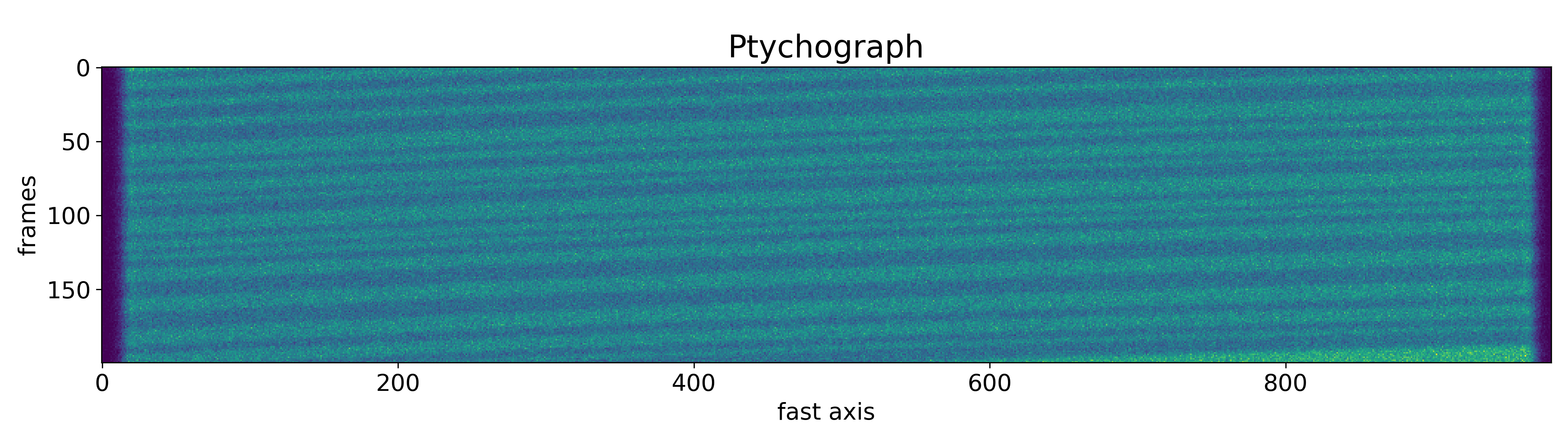
Or you can directly generate an pyrost.STData data container to perform the Speckle Tracking algorithm.
>>> sim_obj = st_sim.STSim(params)=
>>> ptych = sim_obj.ptychograph()
>>> st_conv = st_sim.STConverter()
>>> st_data = st_conv.export_data(ptych, sim_obj)
Command-line interface
You can perform the whole simulation procedure with one command python -m pyrost.simulation. To see all available arguments
just type python -m pyrost.simulation --help.
$ python -m pyrost.simulation --help
usage: __main__.py [-h] [-f INI_FILE] [--defocus DEFOCUS]
                   [--det_dist DET_DIST] [--step_size STEP_SIZE]
                   [--n_frames N_FRAMES] [--fs_size FS_SIZE]
                   [--ss_size SS_SIZE] [--p0 P0] [--wl WL] [--th_s TH_S]
                   [--ap_x AP_X] [--ap_y AP_Y] [--focus FOCUS] [--alpha ALPHA]
                   [--ab_cnt AB_CNT] [--bar_size BAR_SIZE] [--bar_sigma BAR_SIGMA]
                   [--bar_atn BAR_ATN] [--bulk_atn BULK_ATN]
                   [--rnd_dev RND_DEV] [--offset OFFSET] [-v] [-p]
                   out_path

Run Speckle Tracking simulation

positional arguments:
  out_path              Output folder path

optional arguments:
  -h, --help            show this help message and exit
  -f INI_FILE, --ini_file INI_FILE
                        Path to an INI file to fetch all of the simulation
                        parameters (default: None)
  --defocus DEFOCUS     Lens defocus distance, [um] (default: 400.0)
  --det_dist DET_DIST   Distance between the barcode and the detector [um]
                        (default: 2000000.0)
  --step_size STEP_SIZE
                        Scan step size [um] (default: 0.1)
  --n_frames N_FRAMES   Number of frames (default: 300)
  --fs_size FS_SIZE     Fast axis frames size in pixels (default: 2000)
  --ss_size SS_SIZE     Slow axis frames size in pixels (default: 1000)
  --p0 P0               Source beam flux [cnt / s] (default: 200000.0)
  --wl WL               Wavelength [um] (default: 7.29e-05)
  --th_s TH_S           Source rocking curve width [rad] (default: 0.0002)
  --ap_x AP_X           Lens size along the x axis [um] (default: 40.0)
  --ap_y AP_Y           Lens size along the y axis [um] (default: 2.0)
  --focus FOCUS         Focal distance [um] (default: 1500.0)
  --alpha ALPHA         Third order abberations [rad/mrad^3] (default: -0.05)
  --ab_cnt AB_CNT       Lens' abberations center point [0.0 - 1.0] (default:
                        0.5)
  --bar_size BAR_SIZE   Average bar size [um] (default: 0.1)
  --bar_sigma BAR_SIGMA
                        Bar haziness width [um] (default: 0.01)
  --bar_atn BAR_ATN     Bar attenuation (default: 0.3)
  --bulk_atn BULK_ATN   Bulk attenuation (default: 0.0)
  --rnd_dev RND_DEV     Bar random deviation (default: 0.6)
  --offset OFFSET       sample's offset at the beginning and the end of the
                        scan [um] (default: 0.0)
  -v, --verbose         Turn on verbosity (default: True)
  -p, --ptych           Generate ptychograph data (default: False)

$ python -m pyrost.simulation results/sim_results --bar_size 0.7 --bar_sigma 0.12 \
--bar_atn 0.18 --bulk_atn 0.2 --p0 5e4 --th_s 8e-5 --n_frames 200 --offset 2 \
--step_size 0.1 --defocus 150 --alpha 0.05 --ab_cnt 0.7 --rnd_dev 0.8 -p -v
The simulation results have been saved to results/sim_results
As you can see below, the simulated Speckle Tracking scan was saved to a CXI file.
$ h5ls -r results/sim_results/data.cxi
/                        Group
/entry_1                 Group
/entry_1/data_1          Group
/entry_1/data_1/data     Dataset {200, 1, 2000}
/entry_1/instrument_1    Group
/entry_1/instrument_1/detector_1 Group
/entry_1/instrument_1/detector_1/basis_vectors Dataset {200, 2, 3}
/entry_1/instrument_1/detector_1/distance Dataset {SCALAR}
/entry_1/instrument_1/detector_1/x_pixel_size Dataset {SCALAR}
/entry_1/instrument_1/detector_1/y_pixel_size Dataset {SCALAR}
/entry_1/instrument_1/source_1 Group
/entry_1/instrument_1/source_1/energy Dataset {SCALAR}
/entry_1/instrument_1/source_1/wavelength Dataset {SCALAR}
/entry_1/sample_1        Group
/entry_1/sample_1/geometry Group
/entry_1/sample_1/geometry/translations Dataset {200, 3}
/frame_selector          Group
/frame_selector/good_frames Dataset {200}
/speckle_tracking        Group
/speckle_tracking/defocus Dataset {SCALAR}
/speckle_tracking/mask   Dataset {1, 2000}
/speckle_tracking/roi    Dataset {4}
/speckle_tracking/whitefield Dataset {1, 2000}